Image Editing
Image Editing API enables editing images using simple text prompts. No complex workflows or fine-tuning needed.
Examples of Image Editing
The API has impressive character consistency across repeated modifications. Beginning with a reference image, the character's appearance remains uniform across the entire series, with edit prompts detailed in the captions under each frame.

Image Input
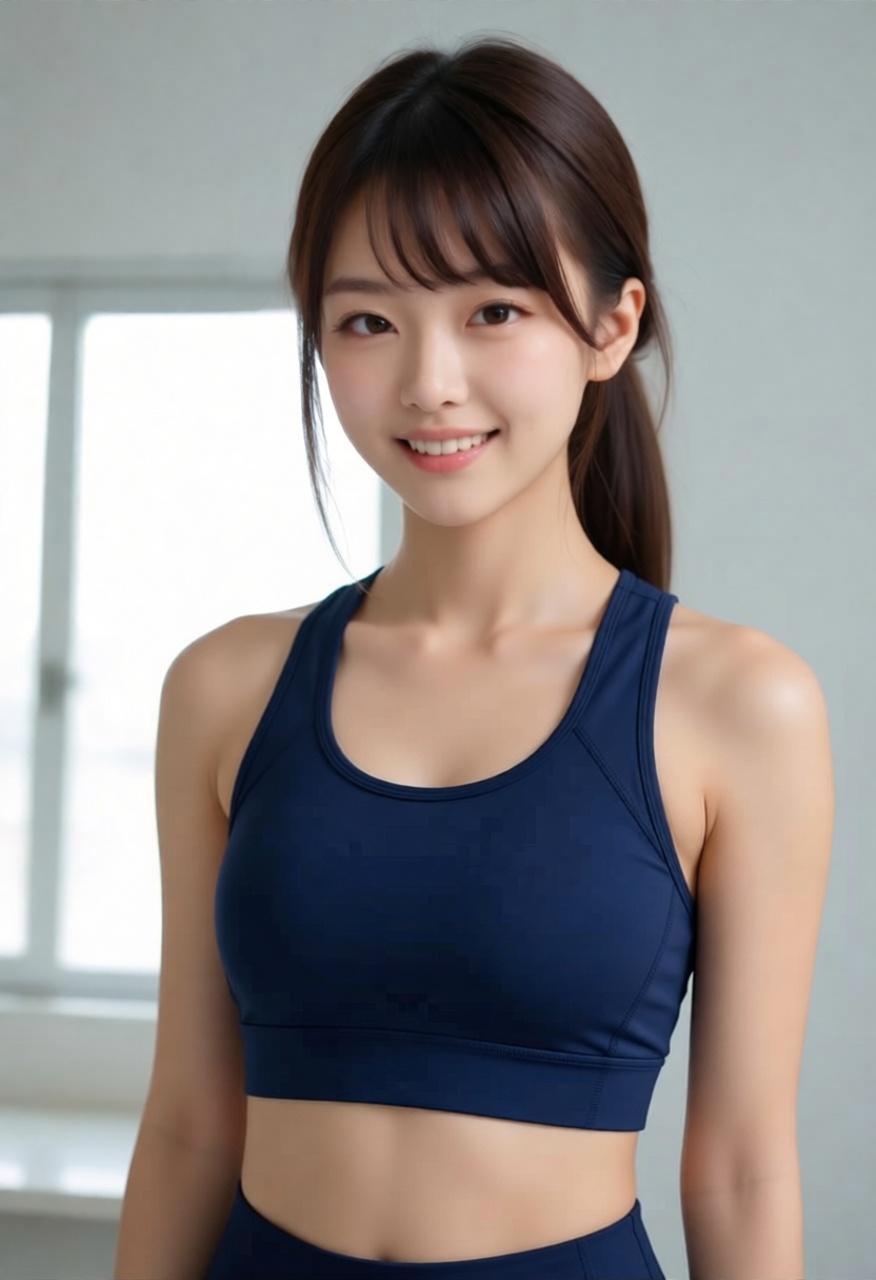
Change clothes to a sporty top
Using Image-to-Image API for Image Editing
The API requires both a text prompt and an input image (≤ 5 MB) to work, with the input image serving as the base that will be edited according to your prompt.
https://open.eternalai.org/creative-ai/image
Request Example
curl --request POST \
--location 'https://open.eternalai.org/creative-ai/image' \
--header 'x-api-key: <YOUR_API_KEY>' \
--header 'Content-Type: application/json' \
--header 'accept: application/json' \
--data '{
    "messages": [
        {
            "role": "user",
            "content": [
                {
                    "type": "text",
                    "text": "Change the outfit to a sporty top. Keep the same person, pose, lighting, and background."
                },
                {
                    "type": "image_url",
                    "image_url": {
                        "url": "https://cdn.eternalai.org/feed/2025/12/29/5ba974c9-d0c1-44c9-a65b-720bec126615.jpg",
                        "filename": "input.jpg"
                    }
                }
            ]
        }
    ],
    "type": "edit"
}'
| Parameter | Type | Default | Description | Required |
|---|---|---|---|---|
role | string | – | Role of the message sender (e.g. user). | Yes |
type | string | – | Content type (text or image_url). | Yes |
text | string | – | Text prompt describing the image edit request. | Yes |
image_url.url | string | – | Base64 encoded image or URL of image (≤ 5 MB) to use as reference. | Yes |
image_url.filename | string | – | Optional filename for the input image. | Yes |
quality | string | low | Image edit quality. "low" (default) or "high". Only applies to type="edit". When set to "high", pricing is 2x. Ignored when lora_config or image_config is present. | No |
Response Example
{
    "request_id": "e4487805-dc63-4ab8-8746-a9cb0594b206",
    "status": "pending",
    "progress": 0
}
| Parameter | Type | Description |
|---|---|---|
request_id | string | Unique identifier of the request to get result |
status | string | Current status of the request (e.g. pending, success). |
progress | integer | Processing progress percentage. |
Poll for Result
Periodically, call the following result retrieval api with the request_id obtained from the previous step to poll for that request's result.
https://open.eternalai.org/creative-ai/result/image
Result retrieval example:
curl --request GET \
--location 'https://open.eternalai.org/creative-ai/poll-result/$REQUEST_ID' \
--header 'accept: application/json'
On success, the response is a JSON object with a result object containing a result_url field. This result_url is a signed URL for retrieving the generated image.
Response Example
{
    "request_id": "b914657b-e736-44f0-93fc-21e181903cf5",
    "status": "success",
    "progress": 100,
    "result_url": "https://cdn.eternalai.org/agents/temp_video_b914657b-e736-44f0-93fc-21e181903cf5_1768372730.mp4",
    "effect_type": "video"
}
High Quality Edit
Use "quality": "high" for higher fidelity image edits. Pricing is 2x compared to the default "low" quality.
quality only applies to type="edit". It is ignored when lora_config or image_config is present.
Request Example with quality: "high"
curl --request POST \
--location 'https://open.eternalai.org/creative-ai/image' \
--header 'x-api-key: <YOUR_API_KEY>' \
--header 'Content-Type: application/json' \
--header 'accept: application/json' \
--data '{
    "messages": [
        {
            "role": "user",
            "content": [
                {
                    "type": "text",
                    "text": "Change the outfit to a sporty top. Keep the same person, pose, lighting, and background."
                },
                {
                    "type": "image_url",
                    "image_url": {
                        "url": "https://cdn.eternalai.org/feed/2025/12/29/5ba974c9-d0c1-44c9-a65b-720bec126615.jpg",
                        "filename": "input.jpg"
                    }
                }
            ]
        }
    ],
    "type": "edit",
    "quality": "high"
}'
Comparison: Low vs High Quality
Input Image
Output — quality: "low" (default)

Output — quality: "high"
Input Image Format
The image_url field in the request accepts .jpg, .jpeg, .png, and .webp formats:
HTTP/HTTPS URL: A direct link to an image.
{
   "type": "image_url",
   "image_url": {
      "url": "https://cdn.eternalai.org/eai_input_img_disrobing_scene.png",
      "filename": "your-image.jpg"
   }
}
Base64 Encoded Image: A data URI format string (e.g., data:image/png;base64,...).
{
   "type": "image_url",
   "image_url": {
      "url": "data:image/png;base64,/9j/4AAQSkZJRgABAQEASABIAAD/2wBDAAQDAwQDAwQEAwFEZ//Z",
      "filename": "your-image.jpg"
   }
}
Available LoRAs
You can apply specific LoRA effects by including the image_config parameter in your request. This allows for specialized edits such as skin enhancement, lighting restoration, and more.
curl --request GET --location 'https://open.eternalai.org/creative-ai/edit-image/effects' | jq
Supporting LoRAs
- Upscale
- Lora ID:
upscale - Model ID:
Qwen-Image-Edit-2509 - Request payload example:
curl --request POST \
--location 'https://open.eternalai.org/creative-ai/image' \
--header 'x-api-key: <YOUR_API_KEY>' \
--header 'Content-Type: application/json' \
--header 'accept: application/json' \
--data '{
    "messages": [
        {
            "role": "user",
            "content": [
                {
                    "type": "text",
                    "text": "Enhance image quality. Keep everything else unchanged."
                },
                {
                    "type": "image_url",
                    "image_url": {
                        "url": "https://cdn.eternalai.org/effects-19-11/images/upscale/input.jpg",
                        "filename": "input.jpg"
                    }
                }
            ]
        }
    ],
    "model_id": "Qwen-Image-Edit-2509",
    "type": "edit",
    "image_config": {
        "loras": ["upscale"]
    }
}'
- Demonstration:
input
.png)
prompt
"Enhance image quality. Keep everything else unchanged. "
output
.png)